top of page

Revision Checklist
Stay organised and on track with your revision checklist.
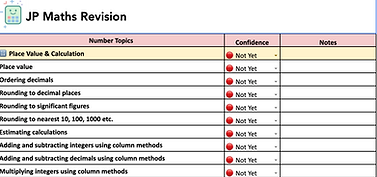
Instructions
1. Select Higher or Foundation and download to your device.
2. Go to https://docs.google.com/spreadsheets/
3. File -> Import -> Upload
4. Upload the downloaded file.
5. Select "Open", and the tracker should appear.
How to Use the GCSE Revision Hub
Watch this short video to see how the GCSE Revision Hub works and how to get the most out of it.
How it works
A simple 4-step process to help you focus your revision.
1. Take Knowledge Test
Complete tests with one question from each topic to assess confidence.
3. Watch Video Solutions
Watch step by step solutions to understand your mistakes.
2. Check Your Tracker
4. Use Revision Hub
Your tracker highlights the areas you are more confident in and weaker in.
Go to the GCSE revision hub and work through areas of weakness.
bottom of page